

Introducing Push Notifications on Subify


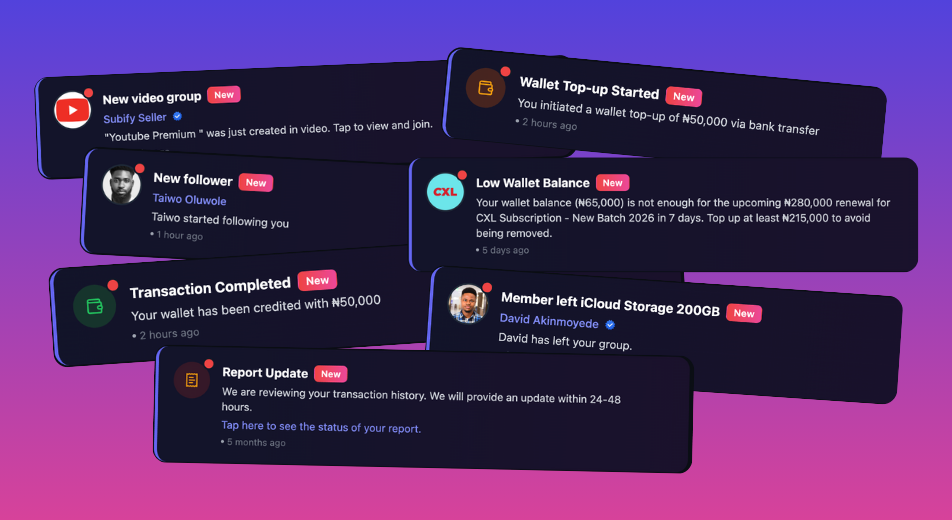
🔔 Subify Now Supports Browser Push Notifications
We're thrilled to introduce browser push notifications to all Subify users! Starting today, you can receive real-time alerts directly in your browser — even when you're not actively using Subify.
Why Push Notifications?
Previously, important updates on Subify were either gated inside the app or sent via email for critical actions. While email notifications remain an essential channel, we know that many of you wanted faster, more immediate alerts. That's why we've built push notifications to keep you informed the moment something happens.
What You'll Get Notified About
With push notifications enabled, you'll receive instant alerts for:
- Billing reminders — Get notified before your subscription group renewal date so you can top up your wallet in time.
- Payment confirmations — Know immediately when a payment is successful or when you receive funds.
- Group activity — Stay updated when new members join your group, when someone leaves, or when your group admin posts an update.
- New messages — Never miss a direct message or group chat message from other members.
- New followers — Get notified when someone follows you on Subify.
- Split bill updates — Know when someone pays their share of a split bill or when you're invited to a new split.
- Low wallet balance warnings — We'll alert you when your balance might not cover an upcoming renewal.
- New subscription groups — Be the first to know when a group is created for a subscription you're interested in.
How to Enable Push Notifications
Enabling push notifications on Subify takes just a few seconds:
- Log in to Subify on your browser (Chrome, Firefox, Edge, or Safari).
- When you see the notification opt-in dialog, tap "Enable notifications".
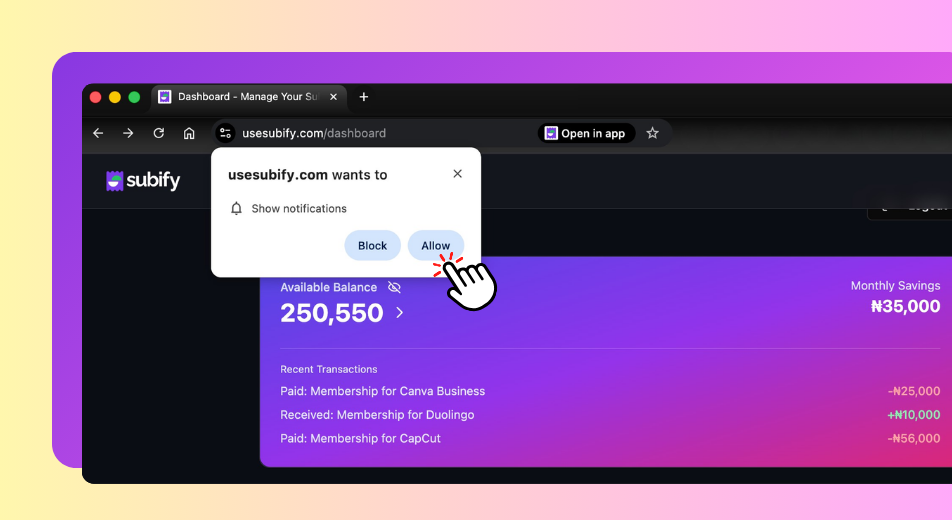
- Your browser will show a permission prompt — click "Allow" to grant Subify permission to send you notifications.
- That's it! You'll start receiving push notifications immediately.
What If I Missed the Dialog?
If you dismissed the dialog or accidentally clicked "Not now", don't worry! The dialog will appear again on your next visit. You can also enable notifications manually:
- Chrome: Click the lock icon in the address bar → Site settings → Notifications → Allow
- Firefox: Click the lock icon → Connection secure → More information → Permissions → Notifications → Allow
- Edge: Click the lock icon → Site permissions → Notifications → Allow
- Safari: Go to Safari → Preferences → Websites → Notifications → Allow for usesubify.com
Privacy & Control
Your privacy matters to us. Here's what you should know:
- Push notifications are completely optional. You can enable or disable them at any time.
- We never send spam or marketing through push notifications — only relevant activity alerts.
- You can revoke notification permissions at any time through your browser settings.
- Your notification subscription data is encrypted and stored securely.
Supported Browsers
Push notifications work on most modern browsers:
- Google Chrome (desktop & Android)
- Mozilla Firefox (desktop & Android)
- Microsoft Edge
- Safari (macOS Ventura and later)
- Opera
- Samsung Internet
Note: iOS Safari on iPhone and iPad requires adding Subify to your home screen as a PWA (Progressive Web App) for push notifications to work.
From Email to Push — Better Together
Push notifications don't replace email notifications — they complement them. Critical alerts like payment failures, account suspensions, and billing reminders will continue to be sent via email. Push notifications add a real-time layer so you're always in the know, even when you're not checking your inbox.
We're Just Getting Started
This is the first step in making Subify more responsive and connected. We're actively working on more notification customization options, including the ability to choose exactly which types of push notifications you want to receive.
Have feedback or questions about push notifications? Contact our support team — we'd love to hear from you.
Happy saving,
The Subify Team
Did you find this article helpful?
10 people found this helpful
Share this article
Related Articles

Netflix Sharing Is Leaving Subify: What This Means for Our Community
Netflix sharing is leaving Subify. As we continue building Subify around responsible and compliant subscription sharing, we’re winding down Netflix sharing by December 31, 2026. Here’s what existing members need to know about the transition, refunds, and the other subscriptions still available on Subify.

Never Miss a Subscription Payment Again: Introducing Upcoming Payments on Subify
Track upcoming subscription payments and bill split deadlines easily with Subify’s new Upcoming Payments feature. Avoid missed payments and service disruptions.